


Connect, Control, and Customize Your Ford Vehicle
The Ford app is everything you need to elevate your Ford ownership – all in one place.
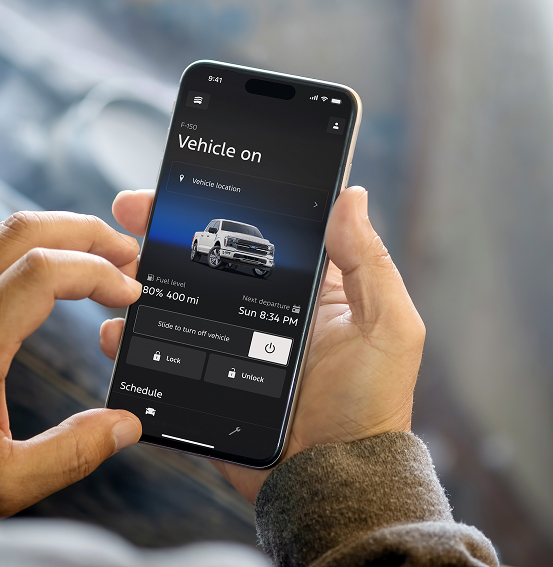
Access complimentary features like remote start, lock and unlock, and vital vehicle information.*
Plus, you’ll earn Points when you buy or lease a new vehicle†† or get service at our dealership with Ford Rewards.
Download the Ford App* to join Ford Rewards† and enjoy all the benefits it has to offer.


The Ford App is Your Gateway to More
Access complimentary remote features, check your fuel level, schedule service, and more with support that’s just a tap away.*
Ford Rewards is More Rewarding in Every Way
With Ford Rewards, earn and redeem Points† for many of the things you already do with us, including vehicle service and maintenance. You’ll even earn 31,000 Points†† when you buy or lease a new vehicle – a value over $150. Use these Points as you see fit toward future service, accessories and even your next new Ford vehicle. The choice is yours.
Plus, now unlock exclusive benefits with three membership Tiers.

Ford ownership • Weber Ford
Get your Ford and phone connected
The Ford app can connect an eligible vehicle to supported remote controls, vehicle information and ownership resources. If you are setting up a new-to-you Ford or need help with an existing connection, start with the correct vehicle, your Ford Account and the authorization shown on the vehicle’s display.
Start with the vehicle connection
Ford’s current app setup guide asks you to sign in or create a Ford Account, add the vehicle, and connect to it. Supported remote functions require the appropriate vehicle equipment and an activated modem.
Have your phone and vehicle together for authorization. Follow the app prompts and accept the connection request on the vehicle display. When the process requires the vehicle to run, park in an open, well-ventilated location and follow Ford’s instructions.
The app layout and available functions can vary with the phone, vehicle and software. Use Ford’s modem-activation instructions for the current steps, then check whether the vehicle connection completed.
Know which task you are trying to complete
| What you need | First check | Next step |
|---|---|---|
| Remote start, lock or vehicle status | Vehicle eligibility, modem authorization and phone/vehicle connection. | Use the official app connection guidance; note any message. |
| Navigation, hotspot or a paid connected service | The feature and plan attached to the specific VIN. | Read our Connectivity Package guide and the current Ford terms. |
| A vehicle warning or maintenance concern | The actual warning wording, mileage and operating symptoms. | Contact the service team with the vehicle information. |
| Ford Rewards earning or redemption | The Rewards account and the transaction involved. | Use the current Rewards rules and ask about that specific transaction. |
Buying or selling a used Ford
When you take ownership of a used vehicle, complete the account and vehicle connection process for yourself. Ask about the appropriate reset and authorization steps for the vehicle rather than assuming a previous owner’s app access or service plan becomes yours.
A vehicle reset can affect connected accounts and services. Review the matching owner guidance and current plan terms before resetting a vehicle. If your account cannot connect, give Ford support the VIN and exact activation message; the app’s help route can assist with account-specific issues.
Looking for a different vehicle? Browse used vehicles and ask about app-compatible equipment on the individual listing.
Separate app support from vehicle service
A remote command that does not complete can have several explanations. Check the app connection and the message provided. Ford’s support guidance identifies vehicle eligibility, cellular connection and vehicle conditions as relevant; a failed command alone does not identify a broken component.
If the vehicle also has a warning light, starting problem or other operating symptom, tell our service team what happens in the vehicle itself. Have the VIN, mileage and warning wording ready when you request a service appointment.
For plan activation, hotspot or in-vehicle entertainment questions, continue to our Ford Connectivity Package guide. That page explains what to confirm before choosing a connected-service plan.
Ford app questions
Is the Ford app free?
Ford says the app is free to download and supported remote features are complimentary on eligible, connected vehicles. Separate connected services or third-party subscriptions may have their own charges and terms.
Will remote start work on every Ford?
No. Ford identifies vehicle equipment and connection requirements, and available remote functions vary. Confirm the actual vehicle’s compatibility rather than relying on the presence of an app icon.
Does connecting the app activate every connected service?
No. Modem connection supports the vehicle’s app relationship, while available connected services can require their own activation and plan. Review the services offered for the VIN.
Can the dealership help with Ford Rewards questions?
Ask about the specific purchase or service transaction and use the current Ford Rewards program terms. Earning, redemption and account requirements are separate from whether a remote app command works.
Tell us where setup stopped
Send Weber Ford the VIN or stock number and describe the screen or message you are seeing. We can help route an equipment, ownership or service question. You will find us at 3465 Progress Parkway, Granite City, IL 62040, serving the St. Louis area.
Download Ford App
Get in on the benefits by downloading the Ford App* and start earning Ford Rewards† today.