Weber Ford • Granite City • Greater St. Louis
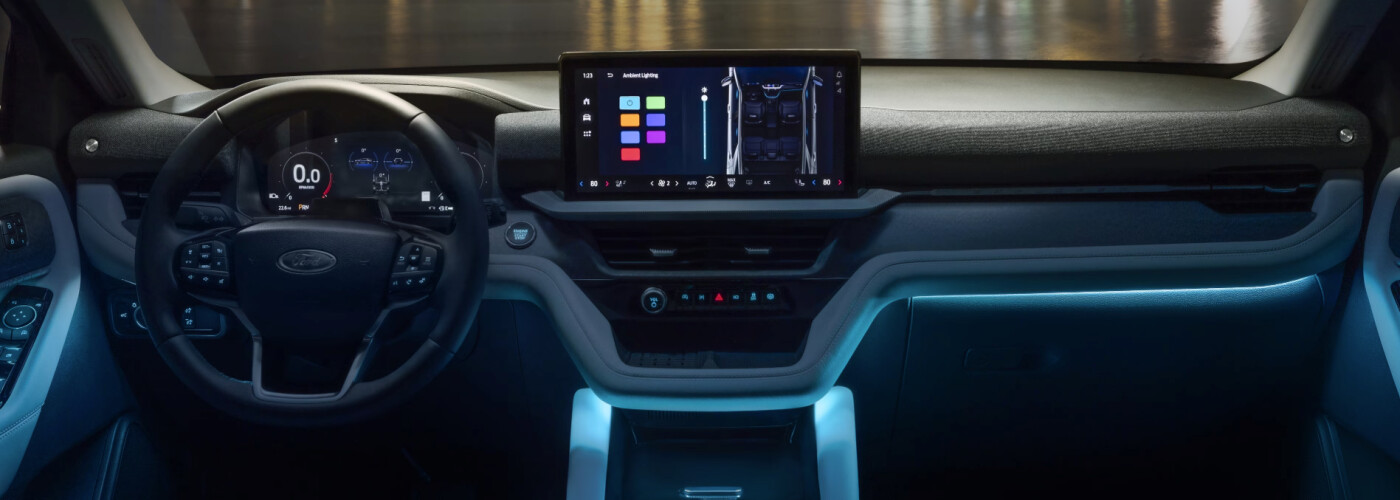
The 2025 Explorer introduced the Ford Digital Experience with a 13.2-inch center touchscreen and 12.3-inch digital instrument display. Audio, cameras and driver-assistance equipment still depend on trim and options. Use this guide to decide what you want demonstrated on an actual Explorer.
Ford lists the Ford Digital Experience, the two displays, wireless Apple CarPlay and Android Auto compatibility, and USB connections across all three seating rows in the 2025 lineup. The center screen and the display directly ahead of the driver serve different purposes.
Built-in Google apps are separate from projecting a phone interface. You can choose the route that fits your habits, but internet-based functions depend on connectivity, compatible accounts and applicable service terms. A large touchscreen does not mean every connected feature is free indefinitely.
This model-year matrix follows Ford’s 2025 order guide. It describes factory configurations; check the original build information and current service status on the vehicle you are considering.
| Trim | Audio reference | Driver assistance | BlueCruise equipment |
|---|---|---|---|
| Active | Six-speaker system. | Co-Pilot360 Assist+. | Not listed as a factory option for Active in this guide. |
| ST-Line | 10-speaker B&O system. | Co-Pilot360 Assist 2.0, including a 360-degree camera. | Equipped; use requires an active plan or eligible trial. |
| ST | 10-speaker B&O; 14-speaker system with the optional Sun and Sound Package. | Co-Pilot360 Assist 2.0. | Equipped; use requires an active plan or eligible trial. |
| Platinum | 14-speaker B&O system. | Co-Pilot360 Assist 2.0. | Equipped; verify the selected vehicle’s current plan. |
Assist+ includes features such as adaptive cruise control with stop-and-go and lane centering, blind-spot monitoring and automatic emergency braking. Assist 2.0 adds equipment and functions, including the 360-degree camera and additional parking assistance, in the applicable 2025 trims.
BlueCruise is a separate hands-free highway-driving feature for equipped vehicles on supported roads and under its operating conditions. It requires an attentive driver and an active plan or eligible trial. It does not make the Explorer self-driving, and the driver remains responsible for taking over when needed.
An earlier owner’s trial is not a promise of a fresh trial for a used buyer. Ask the team to identify the installed hardware and show the connected-services status for the actual vehicle. Do not assume a software update can add missing hardware.
With the Ford Digital Experience, Google Maps and other compatible apps can operate through the vehicle’s system. Apple CarPlay or Android Auto instead brings supported phone functions into the dashboard interface. Bring the phone you actually use and pair it while parked.
Try a familiar destination, a phone call, your preferred music app and the controls for switching audio sources. Check whether the feature uses the vehicle’s connection, your phone’s data or a separate subscription. These details matter more to daily convenience than simply counting apps.
Ford’s Digital Experience information explains how connectivity affects real-time traffic, downloads and streaming. Some video and entertainment functions are intended for parked use; follow the vehicle’s restrictions.
The 2025 Explorer’s connected experience may involve separate services for premium connectivity, the Wi-Fi hotspot, satellite radio and BlueCruise. Their eligibility, account requirements, plan periods and renewal terms are not interchangeable.
Ask which plans are active, when they end and what renewals would cost under the current terms. For a used vehicle, also ask about removing the previous owner’s account and pairing the vehicle to the new owner’s authorized account.
Wireless phone charging is another separate feature. A compatible phone, suitable positioning and installed charging hardware are necessary; a wireless CarPlay connection does not prove that a charging pad is present.
A short, organized demonstration can reveal whether you prefer the standard audio or a B&O system, and whether the camera views make everyday parking easier. Use familiar music at a comfortable volume and try the controls from a normal seating position.
The 2026 lineup and package choices are different. Use the 2026 Explorer safety and driver-assistance guide for that model year. For a 2025 purchase, pair this technology review with the 2025 Explorer overview and Explorer interior guide.
Browse new Explorer inventory or used Explorers, then confirm the year, trim and installed options. If an existing owner has a malfunction or warning message, use service scheduling rather than assuming an upgrade will solve it.
Ford lists a 13.2-inch center touchscreen across the 2025 lineup. Screen size alone does not identify audio, camera, assistance or subscription equipment.
The 2025 order guide does not list BlueCruise for Active. It lists BlueCruise equipment on ST-Line, ST and Platinum, subject to an active plan or eligible trial.
The 2025 ST uses the 10-speaker B&O system as its standard reference; the optional Sun and Sound Package adds the 14-speaker system. Platinum lists 14 speakers as standard.
This page follows Ford’s 2025 Explorer order guide and Ford’s Premium Connectivity information, checked October 29, 2026. Software, services and available plans can change; verify the actual vehicle and account.
Send the stock number and the two or three functions you most want to try. Contact Weber Ford or call 618-452-5400 before visiting 3465 Progress Parkway, Granite City, IL 62040.